
Mervia AcademyLearn
ลานอัฒจันทร์The Amphitheaterจุดเริ่มต้นคอร์สสอนสดWhere live courses begin
ลานอัฒจันทร์ · Batch 2The Amphitheater · Batch 2

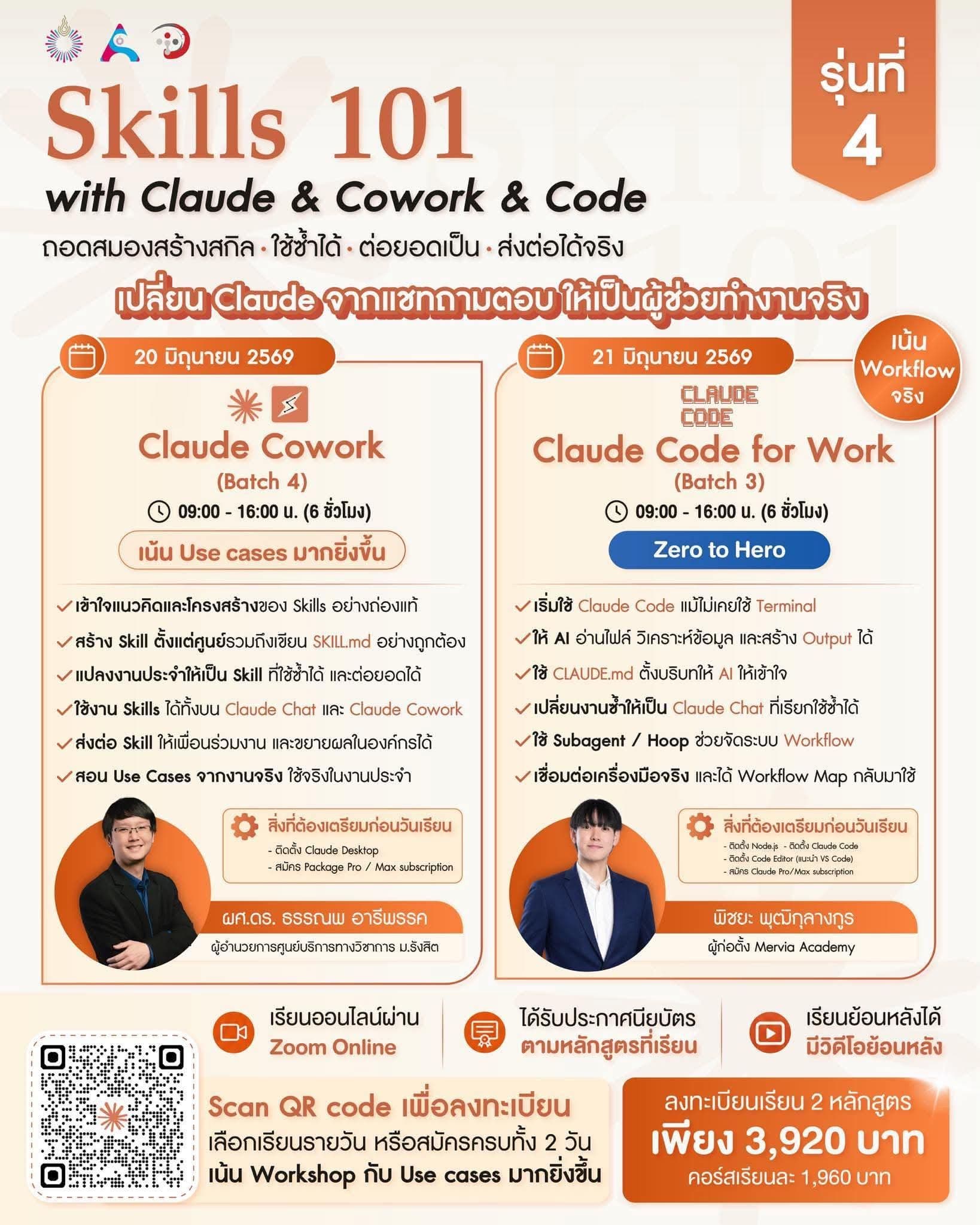
Claude Code for Work: Zero to Hero [Batch 2]Claude Code for Work: Zero to Hero [Batch 2]

จากแชท AI สู่ผู้ช่วยทำงานกับไฟล์จริงและ workflow จริง เวอร์ชันปรับปรุงใหม่ที่ลงมือทำเข้มข้นขึ้นกว่าเดิม พร้อมวิดีโอ setup ให้เตรียมเครื่องก่อนวันเรียนFrom chat AI to a work assistant for real files and real workflows. This improved edition is more hands-on and includes a pre-class setup video guide.

ภาพรวมคลาสCourse overview
รูปแบบFormat
สอนสดเต็มวัน · ลงมือทำกับ workspace จริงFull-day live workshop · hands-on with a real workspace
สถานะStatus
เปิดรอบใหม่new batch21 มิถุนายน 2026Jun 21, 2026ผู้เรียน 150 คน150 students
ก่อนเรียนBefore class
มีวิดีโอ setup ให้ทำตามSetup video guide included
รุ่นCohort
Batch 2 · เวอร์ชันปรับปรุงใหม่ · สอนสดเต็มวันBatch 2 · Improved edition · Full-day live workshop
ราคาPrice
1,960 บาท1,960 THB
ภาษาLanguage
ไทยเป็นหลัก พร้อมศัพท์อังกฤษThai-first, with English terms

สิ่งที่คุณจะได้กลับไปWhat you will leave with

  • ใช้ Claude Code เป็นผู้ช่วยทำงานบนเครื่องตัวเองได้อย่างมั่นใจUse Claude Code confidently as a work assistant on your own computer.
  • ให้ Claude อ่านไฟล์ วิเคราะห์ข้อมูล และสร้าง output เป็นไฟล์กลับมาได้Have Claude read files, analyze data, and create usable output files.
  • รู้ว่าควรเปิด Claude Code ที่โฟลเดอร์ไหน อ่าน permission ยังไง และควร approve อะไรKnow where to open Claude Code, how to read permission prompts, and what to approve.
  • ตั้งบริบทให้ Claude เข้าใจงานของคุณผ่าน CLAUDE.mdSet context so Claude understands your work through CLAUDE.md.
  • เปลี่ยนงานซ้ำให้เป็น Skill ที่เรียกใช้ซ้ำได้Turn repeat work into reusable Skills.
  • แยกงานเฉพาะทางให้ Subagent ช่วยคิด ช่วยตรวจ หรือช่วยวิเคราะห์Split specialist work into Subagents that can think, review, or analyze.
  • ใช้ Hook เพื่อผูก action เข้ากับจังหวะสำคัญของ workflowUse Hooks to attach actions to key moments in a workflow.
  • เห็นวิธีเชื่อม Claude Code กับเครื่องมือทำงานจริงของทีมSee how Claude Code can connect with real team tools.
  • กลับไปพร้อม workflow map สำหรับเริ่มใช้ Claude Code กับงานของตัวเองทันทีLeave with a workflow map for applying Claude Code to your own work immediately.

Course OutlineCourse Outline

Claude Code for Work: Zero to Hero Batch 2 course poster
เวอร์ชันปรับปรุงใหม่Improved edition

ใช้ Claude Code กับงานจริงUse Claude Code for real work

หลังจากรอบที่ผ่านมา ผู้เรียนกว่า 150 คนได้เห็นภาพว่า Claude Code เอาไปต่อยอดกับงานจริงได้ยังไง รอบนี้ลดเวลาหน้างานที่เสียไปกับ install และโฟกัสกับการสร้าง workflow ที่เอากลับไปใช้ได้ทันทีAfter the previous class, 150+ learners saw how Claude Code can be applied to real work. This edition reduces live setup friction and focuses on workflows learners can take back immediately.

เตรียมเครื่องก่อนเรียนPrepare before class

00

Before ClassBefore Class

Recorded Video GuideRecorded Video Guide

เตรียมเครื่องให้พร้อมก่อนเข้า workshopGet your machine ready before the live workshop.

  • ติดตั้ง Claude Code และ login ให้เรียบร้อยInstall Claude Code and complete login.
  • ใช้ CLI / Terminal ขั้นพื้นฐานที่จำเป็นLearn the minimum CLI / Terminal basics needed.
  • ดาวน์โหลด starter workspaceDownload the starter workspace.
  • เข้าใจ global vs local setup แบบง่าย ๆUnderstand global vs local setup in simple terms.
  • เตรียมเครื่องมือสำหรับ Google Workspace workshopPrepare tools for the Google Workspace workshop.
  • Verify ก่อนวันเรียนว่าเครื่องพร้อมใช้งานจริงVerify before class that your machine is ready.

เป้าหมาย: Goal: เข้า workshop แล้วเริ่มลงมือทำได้ทันที ไม่เสียเวลาแก้ install หน้างานEnter the workshop ready to build immediately, without spending live time on installation.

01

Part 1Part 1

ให้ Claude Code ทำงานกับไฟล์จริงMake Claude Code work with real files

เริ่มจากศูนย์ แล้วทำ output แรกจาก workspace จริงStart from zero and produce the first output from a real workspace.

  • Claude.ai / Claude Cowork / Claude Code ต่างกันอย่างไรHow Claude.ai, Claude Cowork, and Claude Code differ.
  • Claude Code ทำงานผ่าน CLI และ workspace ยังไงHow Claude Code works through the CLI and a workspace.
  • เปิด Claude Code ในโฟลเดอร์ที่ถูกต้องOpen Claude Code in the right folder.
  • เข้าใจ file, folder, path, permission แบบที่ต้องใช้จริงUnderstand files, folders, paths, and permissions in practical terms.
  • Workshop: ให้ Claude อ่าน workspace และสร้าง output แรกเป็นไฟล์จริงWorkshop: have Claude read a workspace and create the first real output file.

เป้าหมาย: Goal: เปลี่ยนจาก "คุยกับ AI" เป็น "สั่ง AI ให้ทำงานกับไฟล์จริงบนเครื่องเราได้"Move from chatting with AI to directing AI to work on real files on your computer.

02

Part 2Part 2

ทำให้ Claude เข้าใจวิธีทำงานของคุณTeach Claude how you work

ไม่ต้องอธิบาย style, format, กติกา และข้อห้ามซ้ำทุกครั้งStop repeating your style, format, rules, and boundaries every session.

  • CLAUDE.md คืออะไรWhat CLAUDE.md is.
  • Global instruction vs local project instructionGlobal instruction vs local project instruction.
  • ใส่อะไรใน CLAUDE.md ดีWhat belongs in CLAUDE.md.
  • อะไรไม่ควรใส่What should not go in it.
  • ใช้ CLAUDE.md กับงานเอกสาร, content, research, report, team workflowUse CLAUDE.md for docs, content, research, reports, and team workflows.
  • Workshop: สร้าง local CLAUDE.md สำหรับ workspace ของตัวเองWorkshop: create a local CLAUDE.md for your own workspace.

เป้าหมาย: Goal: ทำให้ Claude ทำงานเข้าทางคุณมากขึ้น และลดเวลาที่ต้องอธิบายบริบทเดิมซ้ำในทุก sessionMake Claude fit your way of working and reduce repeated context-setting in every session.

03

Part 3Part 3

เปลี่ยนงานซ้ำให้เป็น SkillTurn repeat work into a Skill

งานที่ต้องทำซ้ำ ไม่ควรเริ่มใหม่ทุกครั้งRepeat work should not restart from a blank prompt every time.

  • Prompt vs CLAUDE.md vs SkillPrompt vs CLAUDE.md vs Skill.
  • Skill คือ workflow ที่เรียกใช้ซ้ำได้A Skill is a reusable workflow.
  • Anatomy ของ SKILL.mdAnatomy of SKILL.md.
  • เขียน trigger, steps, output, quality checkWrite triggers, steps, output, and quality checks.
  • Workshop: สร้าง Skill จากงานจริง เช่น สรุปประชุม เขียน brief ตรวจ checklist จัด notes หรือทำ weekly reportWorkshop: build a Skill from real work such as meeting summaries, briefs, checklists, notes, or weekly reports.

เป้าหมาย: Goal: ได้ workflow draft ที่เรียกใช้ซ้ำได้ แทนการเริ่มจาก prompt เปล่าทุกครั้งLeave with a reusable workflow draft instead of starting from an empty prompt every time.

04

Part 4Part 4

ทำให้ Workflow ฉลาดขึ้นด้วยผู้ช่วยเฉพาะทางและ Event-based ActionsMake workflows smarter with specialists and event-based actions

ช่วงนี้จะพาให้ Claude Code ไม่ได้ทำงานเป็นก้อนเดียว แต่เริ่มแยกบทบาท และมี action รอบ workflow ที่ช่วยให้ทำงานเป็นระบบขึ้นThis part moves Claude Code beyond one big chat by separating roles and adding actions around key workflow moments.

  • Subagent คืออะไรWhat a Subagent is.
  • ใช้ Subagent แยกงานเฉพาะทาง เช่น research, review, writing, planning หรือ analysis ได้ยังไงHow Subagents separate specialist work such as research, review, writing, planning, or analysis.
  • Pattern: main Claude ทำงานหลัก -> Subagent ช่วยงานเฉพาะทาง -> คนตัดสินใจขั้นสุดท้ายPattern: main Claude does the core work -> Subagent handles specialist work -> human makes the final decision.
  • Hook คืออะไรWhat a Hook is.
  • Hook คือ action อัตโนมัติที่ทำงานตาม event ของ Claude CodeA Hook is an automatic action that runs on Claude Code events.
  • ตัวอย่าง Hook: แจ้งเตือน, log, format, run check หรือช่วยกัน action ที่เสี่ยงHook examples: notify, log, format, run checks, or help prevent risky actions.
  • Demo: Hook ง่าย ๆ ที่ทำให้เห็นว่า Claude Code มี workflow event ที่เราต่อ action เข้าไปได้Demo: a simple Hook showing how Claude Code exposes workflow events you can attach actions to.

เป้าหมาย: Goal: เริ่มออกแบบ workflow ที่มีทั้ง "คนทำงานหลัก", "ผู้ช่วยเฉพาะทาง" และ "action อัตโนมัติรอบจังหวะสำคัญ" เพื่อให้งานที่ได้มีโครงสร้าง ตรวจซ้ำได้ และนำไปใช้ต่อได้จริงStart designing workflows with a core worker, specialist helpers, and automatic actions around important moments so the work is structured, reviewable, and reusable.

05

Part 5Part 5

ต่อ Claude Code เข้ากับเครื่องมือทำงานจริงConnect Claude Code to real work tools

หลังจาก Claude ทำงานกับไฟล์ในเครื่องได้แล้ว
ช่วงนี้จะพาไปดูว่า Claude Code ต่อเข้ากับเครื่องมือที่ทีมใช้อยู่จริงได้ยังไง

ใน workshop จะใช้ Google Workspace เป็นตัวอย่าง เพื่อให้เห็นว่า Claude Code สามารถอ่านข้อมูลจากเครื่องมือทำงานจริง แล้วช่วยเปลี่ยนให้เป็น output ที่ใช้ต่อได้
After Claude can work with local files, this part shows how Claude Code can connect with tools your team already uses.

The workshop uses Google Workspace as the example so learners can see Claude Code read real work data and turn it into usable output.

  • ให้ Claude Code อ่านข้อมูลจากเครื่องมือทำงานจริงแบบควบคุมได้Let Claude Code read data from real work tools in a controlled way.
  • เปลี่ยนข้อมูลดิบให้เป็น summary, report, insight หรือ action listTurn raw data into summaries, reports, insights, or action lists.
  • เข้าใจ boundary ว่าอะไรให้ Claude อ่านได้ อะไรต้องให้คนตัดสินใจเองUnderstand boundaries: what Claude may read and what humans must decide.
  • เห็นภาพว่าหลักการเดียวกันนี้ต่อยอดไปเครื่องมืออื่นของทีม, MCP หรือ workflow ภายในองค์กรได้ยังไงSee how the same pattern extends to other team tools, MCP, or internal workflows.

เป้าหมาย: Goal: เห็นวิธีพา Claude Code ออกจาก workspace local ไปเชื่อมกับข้อมูลในระบบงานจริง โดยยังคุมขอบเขต ความปลอดภัย และการตัดสินใจสุดท้ายไว้ที่คนSee how to move Claude Code beyond the local workspace into real work systems while keeping scope, safety, and final decisions under human control.

+

Extra ModuleExtra Module

Token, Model และการใช้ Claude Code ให้คุ้มขึ้นTokens, models, and using Claude Code efficiently

ส่วนเสริมสำหรับคนที่อยากใช้ Claude Code ได้เร็วขึ้น ประหยัดขึ้น และไม่ให้ session พังกลางทางAn extra module for using Claude Code faster, more efficiently, and with fewer broken long sessions.

  • Token คืออะไร และทำไม prompt / file / tool output ถึงกิน tokenWhat tokens are, and why prompts, files, and tool outputs consume them.
  • Context window คืออะไร และทำไม Claude เริ่มหลุดเมื่อ context เริ่มรกWhat the context window is, and why Claude drifts when context gets noisy.
  • เลือก model ยังไงให้เหมาะกับงาน: งานคิด, งานเขียน, งานตรวจ, งานยาวHow to choose a model for thinking, writing, review, or long work.
  • วิธีเขียน prompt และ CLAUDE.md ให้ไม่เปลือง contextHow to write prompts and CLAUDE.md without wasting context.
  • วิธีแยก instruction, reference, input และ output ไม่ให้ปนกันHow to separate instructions, references, inputs, and outputs.
  • ใช้ /compact, สรุปสถานะ และ handoff ยังไงเมื่อ session เริ่มยาวHow to use /compact, status summaries, and handoffs when sessions get long.
  • หลักการทำงานให้ efficient: ส่ง context เท่าที่จำเป็น ตรวจ output เป็นรอบ และอย่าให้ Claude อ่านทุกอย่างโดยไม่จำเป็นEfficiency principle: send only necessary context, review output in rounds, and avoid making Claude read everything unnecessarily.

เป้าหมาย: Goal: ใช้ Claude Code ได้อย่างมีประสิทธิภาพขึ้น ทั้งเรื่องคุณภาพ ความเร็ว และ token ที่ใช้Use Claude Code more efficiently across quality, speed, and token usage.