
ลดเวลารอ Claude limit จาก 5 ชั่วโมง ให้เหลือ 1-4 ชั่วโมงshift your Claude usage window so workdays start mid-cycle
ใช้ Claude Code routine ตั้งให้ Claude เริ่มรอบ limit 5 ชั่วโมงล่วงหน้า เวลามาทำงานจริงรอบนั้นจะเหลือเวลาแค่ 1-4 ชั่วโมง แล้วก็ขึ้นรอบใหม่พอดีuse a Claude Code routine to start the 5-hour limit window before you actually sit down to work, so your real session begins with most of the limit already burned off

heads-up: the title is a little clickbaity. this trick does not raise your quota — it shifts when the 5-hour window starts so the window better matches your actual work hours.
Claude counts the 5-hour limit from the first message you send in a fresh window. if you let Claude start a window before you sit down to work, by the time you actually start, the window already has 1–4 hours left instead of a full 5. you burn through the rest, a new window opens — and you've effectively skipped the awkward "wait for the window to roll over" gap.
how the window actually works
- the window is a rolling 5-hour bucket, anchored at your first message.
- once a window is open, every message in it counts toward that bucket.
- the bucket resets when the 5 hours expire — not on a calendar boundary.
so if you can nudge the window to open earlier in the day, the reset lands closer to your real workday.
the trick: wake Claude up on a schedule
set a Claude Code routine that sends Claude a tiny "ping" message on a cron schedule. that ping opens a fresh window in the background. by the time you start working, the window is already partway through.
use the cheapest model (Haiku 4.5) for the routine — it's only there to start the window, not to think.
steps
1. open Claude Code on the web
go to the Claude Code web app and sign in.
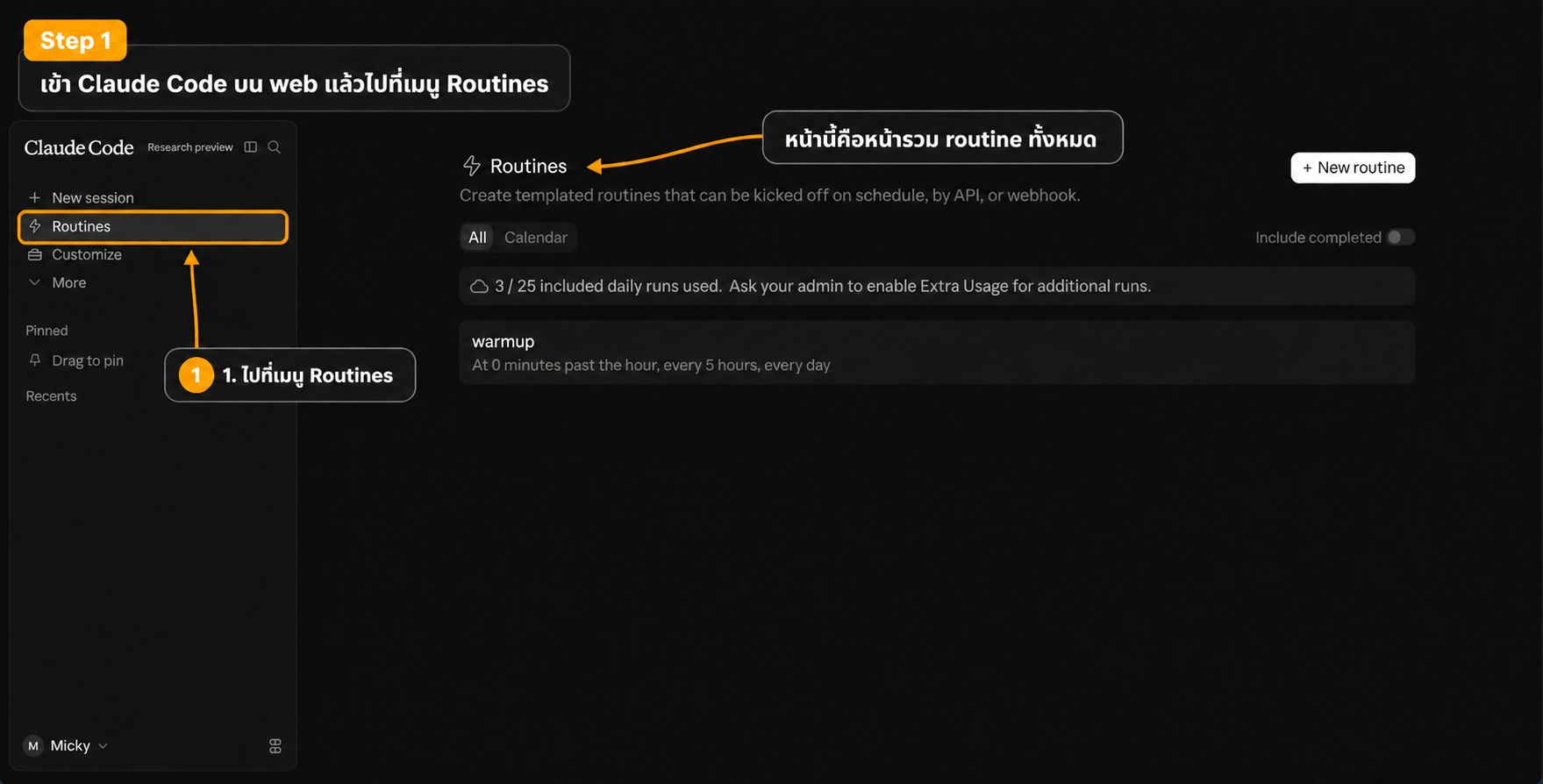
2. go to the Routines tab
it's in the left sidebar.
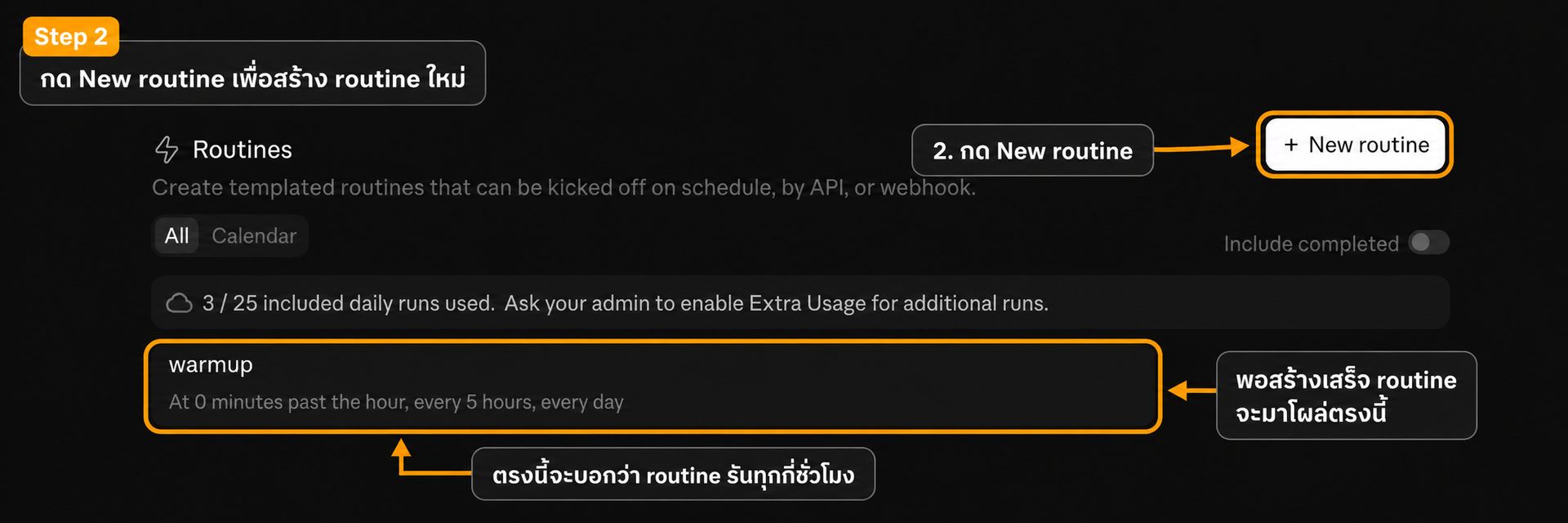
3. click "+ New routine"
top-right of the Routines page.
4. name the routine
warmup is fine — anything memorable works.
5. add a tiny instruction
wake up claude. is enough. even Reply only: hi works. the routine just needs to send something to open the window.
6. choose "Custom schedule"
under Select a trigger, pick the Custom option.
7. set the cron expression
paste 0 */5 * * * — that's "minute 0, every 5 hours" (00:00, 05:00, 10:00, 15:00, 20:00). also make sure the model dropdown is set to Claude Haiku 4.5 so the routine costs almost nothing.
8. click Create
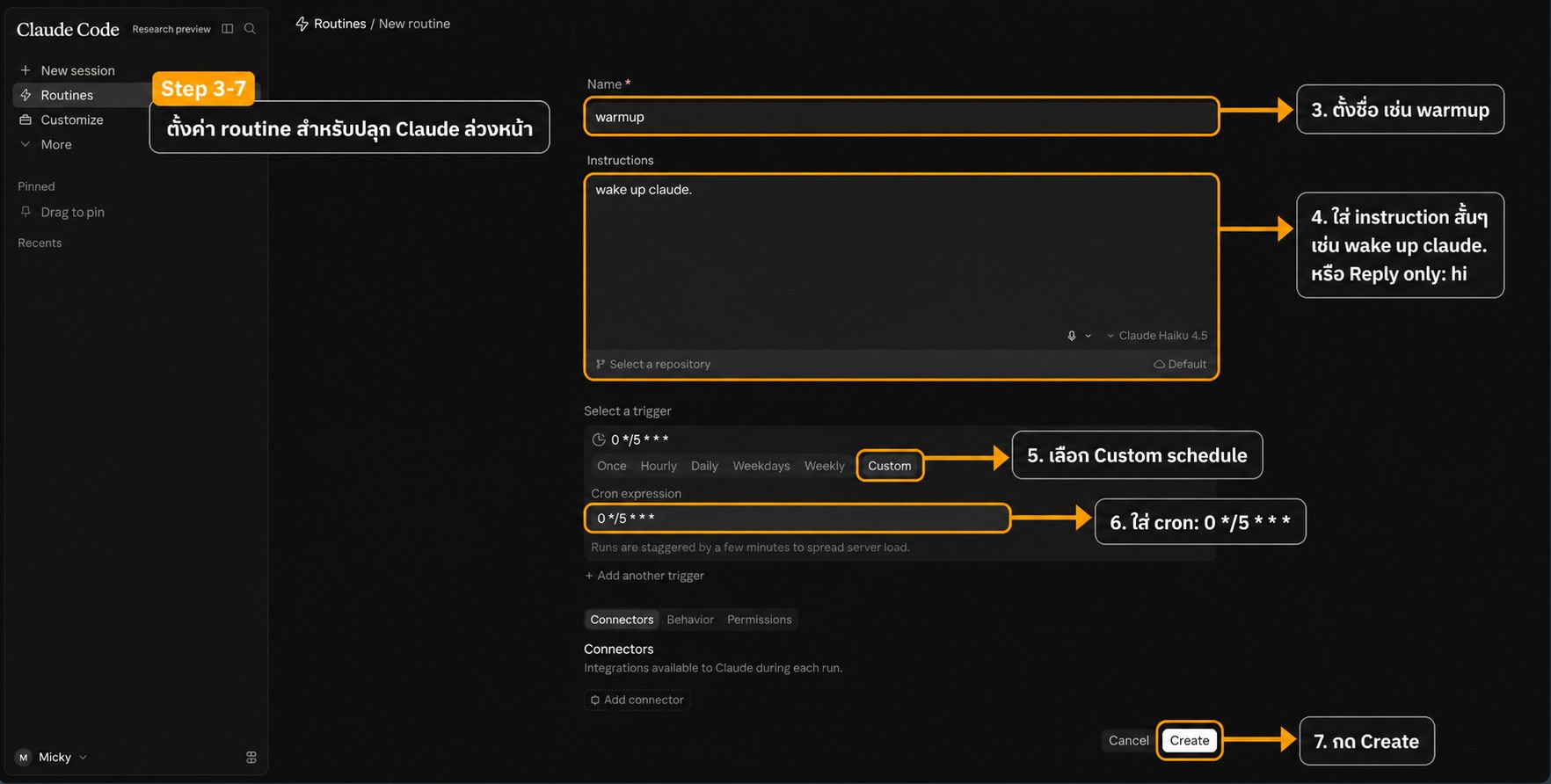
steps 4–8 all happen on the same form, so the screenshot above shows them together.
confirm it's active
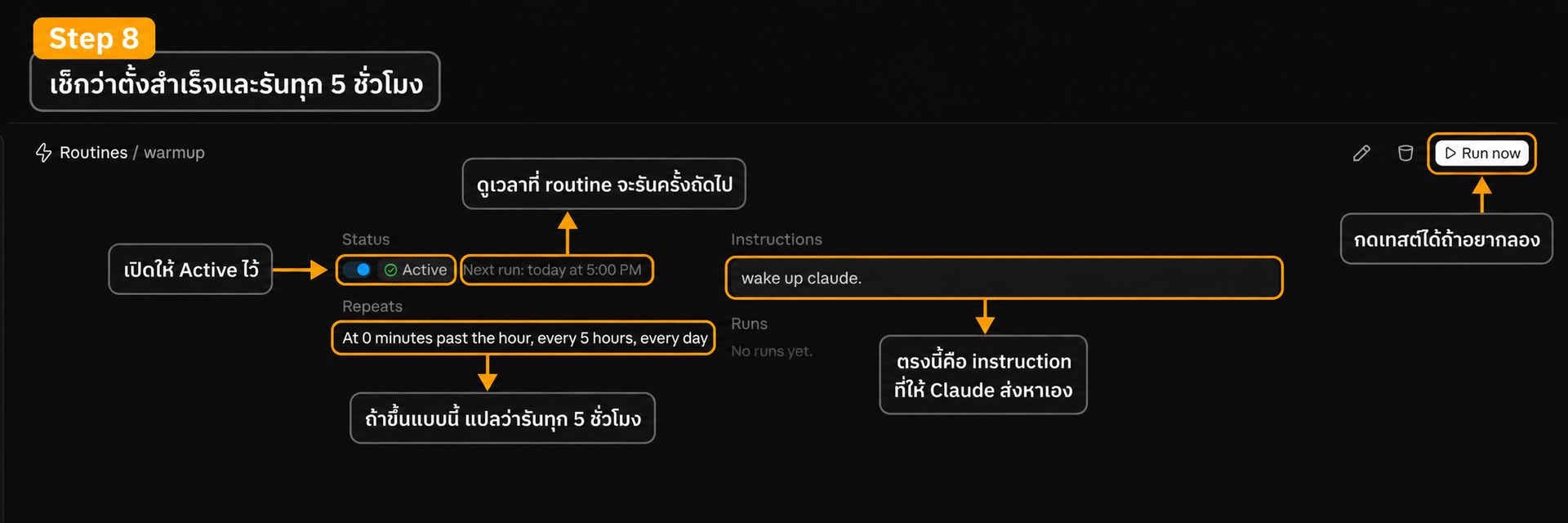
the detail page should show Repeats: At 0 minutes past the hour, every 5 hours, every day and a Next run time. flip Status to Active. you can hit Run now once to test.
tune the cron to your actual work hours
you don't have to use 0 */5 * * * literally. pick the warmup time so the window already has the right amount of time left when you start working:
warmup time = work start − (5 − hours you want left at start)
a couple of examples:
- start work 10:00, want ~3 hours left → warm up at 08:00 → cron
0 3,8,13,18,23 * * * - start work 09:00, want ~2 hours left → warm up at 06:00 → cron
0 1,6,11,16,21 * * *
each cron stays on a 5-hour cadence — you're just choosing which 5-hour offset to ride.
what this does and doesn't do
- does: align the 5-hour limit window with your workday so resets land where you want them.
- does not: add quota, raise limits, or get around any restriction.
if you've got a different way to manage the limit, share it.
หัวข้ออาจจะ clickbait นิดนึง ขอเคลียร์ก่อนว่าวิธีนี้ ไม่ได้ เพิ่ม quota นะครับ แค่ขยับ "เวลาที่รอบ limit เริ่มนับ" ให้ตรงกับ workflow เรามากขึ้น
ตอนนี้ Claude นับรอบ limit 5 ชั่วโมงจากตอนที่เราเริ่มคุยครั้งแรกในรอบนั้น ถ้าเราให้ Claude เริ่มรอบไว้ก่อนที่เราจะมานั่งทำงานจริง พอเริ่มงาน รอบนั้นจะเหลือเวลาแค่ 1-4 ชั่วโมง เราก็ใช้ให้หมดแล้วขึ้นรอบใหม่พอดี ไม่ต้องเสียเวลานั่งรอรอบเก่าหมดเอง
รอบ 5 ชั่วโมงทำงานยังไง
- รอบเป็น bucket แบบ rolling 5 ชั่วโมง เริ่มนับจากข้อความแรกที่ส่ง
- ทุกข้อความในรอบนั้นจะถูกบวกเข้าไป
- รอบจะรีเซ็ตตอนครบ 5 ชั่วโมง ไม่ได้รีตามเวลาบนปฏิทิน
ดังนั้นถ้าเราขยับให้รอบเริ่มเร็วขึ้นได้ จุดที่รอบรีเซ็ตก็จะมาใกล้เวลาเริ่มงานเรามากขึ้น
ทริค คือสั่งให้ Claude ปลุกตัวเองตามตาราง
ใช้ Claude Code Routine ตั้งให้ Claude ส่งข้อความสั้นๆ หาตัวเองแบบ cron ข้อความนี้จะไปเปิดรอบใหม่ให้ก่อน พอเรามาเริ่มทำงานจริง รอบก็เดินไปแล้วระดับนึง
ให้ใช้โมเดลถูกที่สุดอย่าง Haiku 4.5 พอครับ เพราะ routine ตัวนี้แค่เปิดรอบ ไม่ได้คิดอะไรซับซ้อน
ขั้นตอน
1. เข้า Claude Code บนเว็บ
เปิด Claude Code web แล้ว sign in ให้เรียบร้อย
2. ไปที่เมนู Routines
อยู่ใน sidebar ฝั่งซ้าย
3. กด "+ New routine"
ปุ่มอยู่มุมขวาบนของหน้า Routines
4. ตั้งชื่อ routine
ใช้ warmup ก็ได้ จำง่าย
5. ใส่ instruction สั้นๆ
wake up claude. พอ จะใช้ Reply only: hi ก็ได้ routine แค่ต้องส่งอะไรซักอย่างเพื่อเปิดรอบเฉยๆ
6. เลือก Custom schedule
ใต้หัวข้อ Select a trigger เลือก Custom
7. ใส่ cron expression
วาง 0 */5 * * * ลงไป แปลว่า "นาทีที่ 0 ทุกๆ 5 ชั่วโมง" (00:00, 05:00, 10:00, 15:00, 20:00) แล้วเลือกโมเดลเป็น Claude Haiku 4.5 เพื่อให้ routine นี้ใช้ค่าใช้จ่ายน้อยที่สุด
8. กด Create
ขั้นตอน 4-8 ทำในฟอร์มเดียวกันหมด สกรีนช็อตด้านบนจึงครอบคลุมทุกขั้นตอนพร้อมกัน
เช็กให้ active
ในหน้ารายละเอียดควรขึ้น Repeats: At 0 minutes past the hour, every 5 hours, every day พร้อมเวลา Next run เปิด Status ให้เป็น Active ไว้ จะกด Run now เพื่อทดสอบดูก็ได้
ปรับ cron ให้ตรงกับเวลาทำงานจริง
ไม่จำเป็นต้องใช้ 0 */5 * * * ตรงๆ เสมอ เลือกเวลาปลุกที่ทำให้ตอนเริ่มงานรอบเหลือเวลาตามที่อยากได้
เวลาให้ routine ปลุก = เวลาเริ่มทำงาน − (5 − จำนวนชั่วโมงที่อยากให้เหลือ)
ตัวอย่าง
- เริ่มงาน 10:00 อยากให้เหลือ ~3 ชั่วโมง → ปลุกตอน 08:00 → cron
0 3,8,13,18,23 * * * - เริ่มงาน 09:00 อยากให้เหลือ ~2 ชั่วโมง → ปลุกตอน 06:00 → cron
0 1,6,11,16,21 * * *
ทุก cron ยังเดินทุก 5 ชั่วโมงเหมือนเดิม แค่เลือก offset ที่ลงตัวกับเวลาทำงานเรา
สรุป
- ทำได้: ขยับรอบ 5 ชั่วโมงให้ตรงกับเวลาทำงาน รอบรีเซ็ตจะลงตำแหน่งที่เราต้องการ
- ทำไม่ได้: เพิ่ม quota, ขยาย limit หรือเลี่ยงข้อจำกัดอะไร
ถ้ามีวิธี manage Claude limit แบบอื่น มาแชร์กันได้ครับ